
| TL;DR |
|
You need help. You also know that if your assistant slips, the bar calls you, not them. That’s the tension behind learning how to supervise a virtual legal assistant to stay compliant when you’re already the lawyer, the bookkeeper, and the IT department.
You’re not alone in running lean. The ABA 2024 Solo and Small Firm TechReport found that 59% of solo attorneys lack technology policies. So if you don’t have a supervision system yet, you’re starting where most of your peers are.
The good news is that compliance doesn’t require a compliance department. It takes a one-page policy, locked-down access, a review log, and a steady rhythm. Here’s how to build all four in about an hour a week.
What Supervising a Virtual Legal Assistant Means Under ABA Rules
Nonlawyer assistant supervision rests on three duties: oversight, confidentiality, and staying clear of unauthorized practice. Each falls under the broader ethical legal outsourcing rules for solo firms, and here’s what it asks of you day to day.
Rule 5.3 puts the responsibility on you
ABA Model Rule 5.3(b) says a lawyer with direct supervisory authority must make “reasonable efforts to ensure that the person’s conduct is compatible” with the lawyer’s professional obligations. Reasonable efforts means a sensible, documented routine. It doesn’t mean watching a screen all day.
Outside help is expressly allowed. Comment [3] to Rule 5.3 states that you may use nonlawyers outside the firm to help you serve clients. ABA Formal Opinion 498 then confirms the supervision duty “extends to those both within and outside of the law firm.”
Keep in mind these are Model Rules. Your state adopts its own version, so check its wording.
Confidentiality and technology competence
Rule 1.6(c) requires reasonable efforts to prevent unauthorized disclosure of, or access to, client information. Once an assistant logs into your systems, their habits become part of how you meet that duty.
You’re also expected to understand your tools. Comment [8] to Rule 1.1 asks lawyers to keep up with “the benefits and risks associated with relevant technology.”
The LawSites tech competence tracker counts 40 states, the District of Columbia, and Puerto Rico that have formally adopted this duty.
The unauthorized practice line
Rule 5.5(a) bars you from practicing law where you’re not authorized “or assist another in doing so.” Letting an assistant give legal advice puts you on the wrong side of that line.
The North Carolina State Bar’s 2007 Formal Ethics Opinion 12 draws a clear line. Foreign assistants may handle administrative work and limited legal support, but they may not exercise independent legal judgment or advise clients directly.
Step 1: Write a One-Page Supervision Policy
Time is your scarcest resource. Clio’s Legal Trends Report puts average lawyer utilization at 39% of an eight-hour day in 2025, across firms of all sizes. A policy that takes a weekend to write won’t get written, so keep yours to one page.
Cover these six points:
- Approved tasks
- Prohibited tasks
- Approval points, meaning what needs your sign-off before it goes out
- Communication channels for routine updates and urgent issues
- AI-use rules
- An escalation path for anything that feels off
Have your assistant sign it on day one. That signature is the first entry in your supervision trail.
Tasks your assistant can and cannot handle
Your approved list can draw on the many tasks a virtual legal assistant can take off a solo lawyer’s plate. The red lines matter more, so spell them out:
| Your assistant can | Keep with you |
| Schedule consultations and manage your calendar | Deciding whether to take a case |
| Collect intake details and documents | Evaluating the merits of a matter |
| Draft routine correspondence for your review | Giving any legal advice |
| Send documents you’ve approved | Setting or negotiating fees |
| Track deadlines you’ve entered | Signing anything in your name |
A script for when a client asks for legal advice
Clients will ask. Give your assistant these exact words so they never have to improvise:
“That’s a great question for [Attorney Name], and I want you to get the right answer. I’m not able to give legal advice, but I’ll make sure they see your question today. Can I note a few details so they have everything they need?”
Then the assistant logs the question and flags it for you. Still at the hiring stage? Draft this policy alongside the steps for hiring your first legal operations support professional, so the role’s limits are clear from the job description onward.
Step 2: Lock Down Access Before Day One
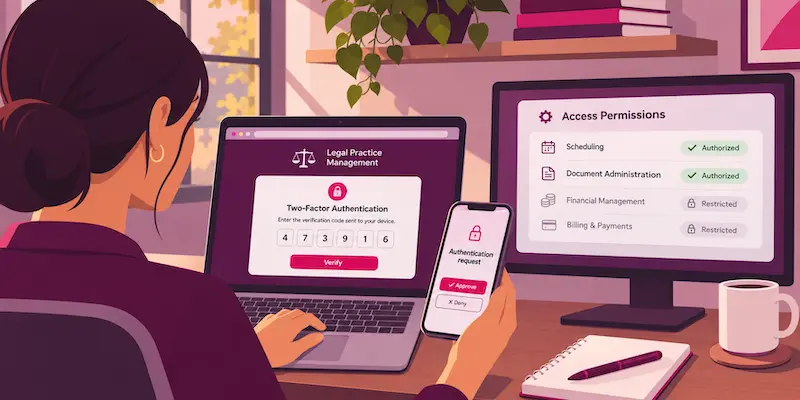
For remote legal assistant confidentiality, access control is your cheapest win. Set it up before your assistant’s first login, not after:
- Give your assistant their own login for every system, and never share yours.
- Turn on two-factor authentication for every account they use.
- Grant only the access each task needs, and add more as trust grows.
- Restrict billing and trust account areas in your practice management software.
- Have your assistant sign a confidentiality agreement before they see any client file.
ABA Formal Opinion 498 also suggests a personal device policy. It covers strong passwords, VPN access, remote wipe, phishing training, and keeping family members away from client information. Add a clean-screen habit: lock the screen whenever the assistant steps away.
For more sensitive files, raise the bar. ABA Formal Opinion 477R notes that highly sensitive information may require special security precautions. Backups, encryption, and secure file sharing round out the data security basics every solo firm should set up.
Step 3: Build a Review and Sign-Off Routine
This routine is the core of nonlawyer assistant supervision. It turns “reasonable efforts” into a record you can show a client or bar investigator.
Daily and weekly checkpoints
For the first 30 days, hold a 10-minute stand-up each morning. Ask three questions: what got done, what’s stuck, and what’s waiting on your approval. After the first month, you can usually drop to two or three check-ins a week.
Once a week, pull a sample of your assistant’s work. Five items are plenty: a few sent emails, a calendar change, an intake note. Record each review in a simple sign-off log with the date, the item, and whether it passed or needed a correction.
Monthly and quarterly audits
Once a month, review who has access to what and remove anything no longer needed. Check your practice management audit trail against your sign-off log.
Once a quarter, refresh the policy and run a short retraining on security and AI use. Have your assistant re-sign the updated page. When you add a second assistant or a second attorney, a risk-tiered supervision model lets you match review depth to each task’s risk.
Ready to put this routine to work with a pre-vetted assistant? Hire a virtual assistant to grow your business.
Step 4: Handle Cross-Border and AI Questions Up Front
Two questions catch solos off guard: where your assistant works and which tools they use. Settle both before they come up with a client.
Client disclosure and consent
ABA Formal Opinion 08-451 says you may outsource support work as long as you remain “ultimately responsible for rendering competent legal services.” It also calls for disclosure and client consent in some outsourcing arrangements involving confidential information.
Some states go further. North Carolina’s 2011 Formal Ethics Opinion 14 requires disclosure and written client consent for offshore work involving confidential client information, even purely clerical tasks. Check your own state’s opinions before your assistant starts.
Rules for using AI tools
ABA Formal Opinion 512 says supervisors must make reasonable efforts to ensure nonlawyers comply with professional obligations when using generative AI. It also expects clear firm policies and training on secure data handling.
Put a short AI rule in your one-page policy:
- Use only the AI tools you’ve approved by name.
- Never paste client confidences into a self-learning tool without the client’s informed consent.
- Flag any AI-assisted draft, so you know to review it closely.
Boilerplate consent buried in an engagement letter isn’t enough for AI use, so get it specifically.
Step 5: Plan for Mistakes and Offboarding
Mistakes happen, and most firms aren’t ready for them. In the ABA’s 2024 Budgeting and Planning TechReport, only 39.9% of respondents across all firm sizes said their firm has an incident response plan. A simple written plan puts you ahead of most of them.
Your mini-plan needs four parts:
- Your assistant reports any problem to you right away, by phone.
- You change passwords, revoke access, or remote-wipe a device as needed.
- You identify which client information was involved and write down what happened.
- You check your state’s rules on whether you must tell clients.
Acting fast matters. Under Rule 5.3(c), you’re responsible if you knew of the conduct in time to limit the damage and failed to take reasonable remedial action.
Offboarding is the other risky moment. On the assistant’s last day, revoke every login, rotate any shared passwords, and remove firm data from their devices. Get written confirmation that client information was returned or deleted, then note the date in your log.
Your Checklist to Supervise a Virtual Legal Assistant

Print this virtual legal assistant checklist and keep it next to your calendar.
| Cadence | Action | Time required | Record to keep |
| Before day one | Sign policy and confidentiality agreement, set up access | About two hours, once | Signed policy, agreement, access list |
| Daily (first 30 days) | 10-minute stand-up | 10 minutes | Short notes on open items |
| Weekly | Review five sample items | About 30 minutes | Sign-off log entries |
| Monthly | Access review and audit trail check | About 30 minutes | Updated access list |
| Quarterly | Policy refresh and retraining | About one hour | Re-signed policy, training date |
| As needed | Incident response or offboarding | Varies | Incident notes, offboarding confirmation |
Why Virtual Latinos Is the Ideal Partner for Delegation
Your supervision routine works best when the person on the other end is already reliable. Virtual Latinos doesn’t take on your ethical duty, but we make it easier to meet.
- Our community includes the top 1% of pre-vetted LATAM talent, screened for English fluency, role-specific skills, and communication style.
- Our human-guided hiring process helps you define the role, shortlist candidates, and onboard your new hire, while you keep the final decision.
- Our professionals work in U.S. time zones, so your morning stand-up happens in real time.
- Our Replacement Guarantee gives you support if the first match isn’t the right fit.
You can meet pre-vetted Virtual Legal Assistants who are ready to learn your policy, your tools, and your sign-off routine.
Key Takeaways
- Have your assistant sign a one-page policy on day one. List approved tasks, red lines, approval points, and AI rules, and make that signature the first entry in your supervision trail.
- Give your assistant the legal-advice script. Exact words for redirecting client questions mean they never have to improvise near the line on unauthorized practice of law.
- Set up access before the first login. Use individual accounts and two-factor authentication, and block the billing and trust account areas.
- Hold a 10-minute stand-up every morning for the first 30 days. Then step down to two or three check-ins a week, and log every review you do.
- Write your incident and offboarding steps now. Know how you’ll revoke access in minutes, and get written confirmation that client data was returned or deleted.
Frequently Asked Questions
Do I need to tell clients I use a virtual legal assistant?
Often yes, depending on your state, and especially when your assistant will handle confidential client information.
- ABA Formal Opinion 08-451 says implied authorization to share client information doesn’t extend to people your firm can’t effectively supervise and control.
- A short engagement letter paragraph naming the role, the tasks, and your safeguards covers most clients.
- Keep each client’s signed acknowledgment in the matter file.
How much supervision is “reasonable” for a solo attorney?
Reasonable supervision under ABA Model Rule 5.3 is a light, documented routine that scales with risk, not a set number of hours.
- Check five pieces of your assistant’s work every week and note the outcome.
- Audit logins and permissions once a month.
- Revisit and re-sign your policy every quarter.
- Review more closely for a new assistant, a sensitive matter, or anything client-facing, and ease off as results stay consistent.
Can my virtual legal assistant sign or send documents on my behalf?
No, your assistant should never sign for you, and that includes filing through your e-filing account.
- Under Federal Rule of Civil Procedure 5(d)(3)(C), a filing you authorize through your electronic-filing account, with your name on the signature block, counts as your signature.
- Sharing that login means anything your assistant files through it carries your signature.
- State courts set their own e-filing rules, so check yours before you assign any filing work.
What records should I keep to prove I supervised my assistant?
Keep one consolidated supervision file per assistant, and start it with the vetting you did before hiring.
- ABA Formal Opinion 08-451 treats reference and background checks on the provider and any placement agency as minimum steps, so save what you asked and what you learned.
- Add the role description and interview notes that show why this person fit the job.
- File your ongoing checklist records in the same folder, so one place answers any question.
- Keep the file after the assistant leaves, since questions about past work can surface later.
Is a virtual legal assistant in Latin America treated differently from one in the U.S.?
No, the same ABA supervision duties apply wherever your assistant works, though some states add disclosure and consent rules for offshore work, covered in Step 4.
- The practical differences are where client data is stored and which country’s law governs your confidentiality agreement.
- Keep client files inside your firm’s own systems, never on the assistant’s personal devices or accounts.
- Name the governing law in your confidentiality agreement so you know how it would be enforced.
Stay in Control While You Delegate
You don’t have to choose between practicing law and running your firm. With a one-page policy, locked-down access, a sign-off log, and a steady cadence, you delegate with confidence and keep the paper trail that protects your license.
Virtual legal assistant compliance done this way also protects your revenue, because consistent support turns busy months into steadier income through flexible legal support.
Ready to get your evenings back? Hire a virtual assistant to grow your business.
This article is general information, not legal advice, so check your state’s rules of professional conduct before you rely on it.