Data entry tools aren’t just about handling numbers and spreadsheets—they’‘re the backbone of your business, ensuring you have accurate, timely information to make confident decisions.
When you hire virtual assistants who have mastered these tools, you’re not just getting technical coverage—you’re securing a long-term partnership that strengthens your core operations.
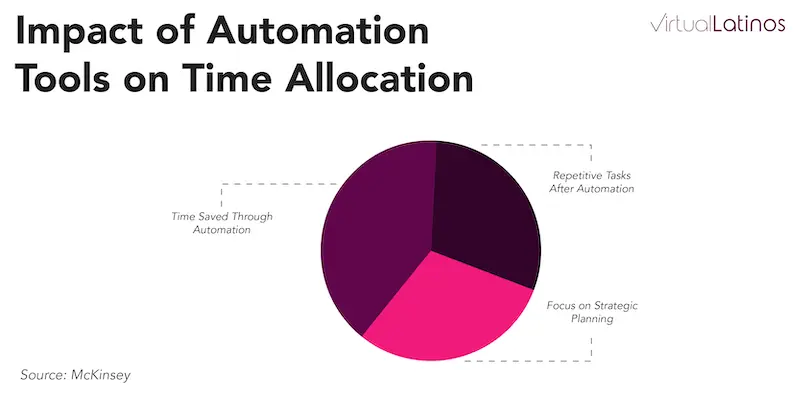
According to McKinsey, businesses that integrate automation tools for data entry can save up to 40% of the time typically spent on repetitive tasks. This saved time enables teams to focus on higher-value activities like strategic planning, demonstrating the transformative potential of the right tools.
This data reveals why choosing virtual assistants who don’t just know these tools—but wield them with professional expertise—can be the difference between staying stuck in administrative chaos and achieving operational excellence.
The full guide on hiring for administrative roles.
Hire the right talent faster.
What is Data Entry?
Data entry is the process of transforming physical or unstructured information—such as handwritten documents, forms, or printed reports—into a structured digital format. This involves inputting data into a computer system or database, often through manual or semi-automated processes.
The goal is to ensure the information is well-organized, easily accessible, and ready for analysis or further use.
Why is data entry important for businesses?
Data entry is a cornerstone of effective business operations. From maintaining customer data to ensuring human resource management systems are accurate, the process supports critical functions like decision-making, quality assurance, and strategic planning.
Accurate and well-organized data enables businesses to make informed decisions and provide valuable insights, creating a significant impact on overall productivity.
What are the main types of data entry?
- Manual data entry
- Online data entry
- Transcription
- Data cleansing and validation
Source: The Knowledge Academy (2024)
Overcoming data entry challenges
Managing data effectively comes with its own set of challenges. Here are the main challenges:
- Accuracy: Ensuring data is entered correctly to avoid costly mistakes
- Efficiency: Completing data entry tasks quickly without sacrificing quality
Accuracy and quality assurance
Maintaining data entry accuracy is crucial. Establish workflows that minimize errors and use tools with error-detection features to ensure high-quality output.
Data security
Choose tools that comply with data security regulations. Protecting sensitive customer data is critical, especially for industries like law firms and digital marketing.
Using strong vulnerability management practices helps you identify, prioritize, and reduce security risks before sensitive data is exposed.
Benefits of Using Data Entry Tools
Data entry tools are game-changers for virtual assistants, simplifying complex tasks, saving time, and reducing errors.
These tools enhance efficiency and accuracy, empowering teams to focus on higher-value projects and strategic goals. Here are the main benefits:
- Time savings: Automates repetitive tasks so you can focus on strategic work
- Improved accuracy: Reduces errors through streamlined data entry processes
- Cost efficiency: Frees up resources for growth-focused initiatives
Boost productivity
By automating time-consuming tasks, data entry tools allow virtual assistants to focus on more strategic planning and complex projects. They save time spent on mundane tasks, allowing teams to work efficiently and complete projects faster. Another mundane task you can outsource is photo clipping path tasks. They take a lot of time but can be done with some training.
Enhance data accuracy
Using tools with built-in quality assurance features, such as real-time data validation, ensures that customer data and job details are error-free. This accuracy supports informed decisions across various business operations, reducing the risk of costly mistakes.
Streamline operations
Modern tools are designed to streamline processes by automating workflows and reducing repetitive tasks. From project or lead management, to email management, these tools ensure smoother daily operations, saving resources and increasing overall productivity.
Meeting Data Entry Needs
When you partner with skilled virtual assistants, you gain access to comprehensive data management services that free your time and resources for higher-level decisions.
- Data Collection: Compiling and organizing raw information for reports or CRM systems.
- File Storage Systems: Digitalizing and managing documents for better accessibility.
- Customer Data Management: Keeping client information accurate and up to date.
Common applications
Virtual assistants from Latin America excel in data entry across sectors like digital marketing, law firms, and human resource management, performing tasks such as creating online forms, managing databases, and supporting CRM systems integration. For teams handling HR data, platforms like Omni HR centralize employee records, payroll data, and leave balances in one system, reducing manual data entry and improving accuracy across people operations.
Whether you’re looking to transform customer data management or eliminate workflow bottlenecks, these tools become your competitive advantage—turning operational chaos into the kind of smooth, scalable processes that fuel sustainable growth.

Top 15 Data Entry Tools
Here are the 15 most effective data entry tools to help virtual assistants streamline processes, improve productivity, and ensure accurate data management.
1. Jotform
Jotform is an intuitive online form builder that helps virtual assistants create customizable forms for efficient data collection. It offers features like drag-and-drop form elements, conditional logic, and integrations with CRMs like HubSpot and Salesforce, making it ideal for collecting and organizing customer data seamlessly.
Jotform integrates easily with automation workflows, making it a top choice for business data collection.
Its robust templates and automation features save you time while maintaining accuracy in your data entry work.
2. Typeform
Typeform stands out with its interactive and user-friendly interface that turns data collection into an engaging experience. Its conversational forms are perfect for gathering feedback, surveys, or customer data, ensuring higher completion rates.
With powerful integrations into tools like Google Sheets and CRMs, Typeform simplifies the data entry process while boosting data accuracy and usability.
3. Foxtrot RPA
Foxtrot RPA is a powerful automation software designed to handle repetitive data entry tasks. It enables virtual assistants to automate workflows like transferring data between systems, updating databases, and generating reports.
By reducing manual errors and speeding up processes, it’s an invaluable tool for businesses handling large volumes of data.
4. Nintex RPA
You can use Nintex RPA to integrate various business tools, automate invoice processing, or update CRM records.
Its ease of use and scalability ensure that both small tasks and enterprise-level projects can be managed efficiently.
5. HubSpot
HubSpot offers a comprehensive CRM platform that simplifies customer data management. Its intuitive dashboard allows you to input, organize, and analyze customer information quickly.
HubSpot’s automation tools reduce manual data entry efforts, while its analytics features provide actionable insights to drive business growth.
With features like HubSpot LinkedIn Integration , customer and lead data can be synced without extra effort, helping teams keep profiles and records accurate across platforms.
6. Zoho CRM
Zoho CRM is a versatile tool for managing customer relationships while simplifying data entry tasks. Its features include automation for data capture, real-time data validation, and seamless integration with other tools like email management systems and project management software.
Zoho CRM enhances productivity and ensures that customer information remains accurate and up to date.
7. QuickBooks
QuickBooks is a leading accounting software that automates financial data entry tasks such as invoicing, expense tracking, and payroll management. Virtual assistants can use QuickBooks to generate financial reports effortlessly while ensuring compliance with accounting standards.
Its integration with banks and payment platforms streamlines the overall bookkeeping process.
8. Asana
Asana is a project management tool that helps virtual assistants manage tasks related to data entry efficiently. It allows users to organize workflows, set deadlines, and collaborate in real-time.
By integrating with tools like Google Sheets and Zapier, Asana ensures that data is accurately tracked and processes are streamlined.
9. Trello
Trello’s visual boards and card system make it easy to manage data entry tasks. Virtual assistants can create cards for each task, add details, set deadlines, and track progress at a glance.
Trello’s ability to integrate with automation tools like Zapier makes it a valuable resource for streamlining repetitive processes.
10. Google Drive
Google Drive is a cloud-based file storage system that provides virtual assistants with a secure and organized platform to store and share data.
Its real-time collaboration features allow teams to work on data entry projects simultaneously, ensuring files are always up to date. Integration with tools like Google Forms enhances its versatility.
11. Preposteo
Prepostseo is a toolkit that offers different online tools. It lets data entry experts automate image-to-text conversion, instantly turn tabular data embedded on images into Excel sheets, and convert PDFs into well-structured Word documents.
So, instead of converting files manually by doing data entry, which is slow and prone to errors, VAs can opt for Prepostseo as a one-stop solution. It reduces significant time and effort, ultimately streamlining the overall workflow.
12. Dropbox
Dropbox offers robust file storage and sharing capabilities, making it a reliable solution for managing data entry files. Its user-friendly interface and advanced file organization features help virtual assistants maintain an efficient workflow.
Dropbox’s security features ensure that sensitive data remains protected while being accessible from anywhere.
13. Microsoft Excel
Microsoft Excel is a classic tool for organizing, analyzing, and validating data. With its advanced functionalities like pivot tables, data filters, and formulas, Excel is essential for virtual assistants handling complex datasets. Its compatibility with other software ensures seamless integration and enhanced productivity.
14. Airtable
Airtable combines the functionality of spreadsheets and databases, providing virtual assistants with a dynamic platform for data management. Its customizable views, collaborative features, and integration capabilities make it perfect for tracking data entry projects and ensuring accuracy in record-keeping.
15. Monday.com
Monday.com is a highly flexible tool that supports task management, project tracking, and data entry. Its visual dashboards and automation features allow virtual assistants to streamline workflows, manage deadlines, and improve collaboration.
Integration with CRMs and data tools further enhances its usability.
16. Zapier
Zapier connects apps and automates workflows, drastically reducing the need for manual data entry. It enables virtual assistants to create automated processes like transferring data from forms or digital booklets to spreadsheets or updating CRMs in real-time.
Zapier’s extensive integration library makes it an indispensable tool for boosting productivity and efficiency.
Best practices for data entry
- Standardization: Use consistent formats for all data entries
- Validation: Regularly check data for errors or inconsistencies
- Security: Protect sensitive information with strong access controls
Additional platforms also exist to assist teams with more advanced workforce needs. For example, the ParallelStaff platform supports nearshore staff augmentation without the risk commonly associated with outsourcing. By connecting businesses directly to experienced developers and IT professionals, organizations can quickly scale operations while maintaining efficiency and data accuracy. This can be beneficial for businesses looking to complement their existing data entry resources or seeking specialized technical support for digital transformation initiatives.
Clear workflows
Define administrative tasks with clarity. Assign roles and set guidelines to reduce errors and improve efficiency in daily operations.
Regular training
Provide virtual assistants with hands-on experience using data entry tools. Training ensures that team members are well-versed in best practices, reducing time spent on fixing errors.
Monitor performance
Track key metrics, such as data accuracy and task completion rates, to identify areas for improvement. This ensures that data entry processes remain efficient and productive.
Integrating data entry with CRM systems
Integrating data entry tools with CRM systems creates a seamless process for managing customer relationships. This combination improves efficiency and provides valuable insights for strategic planning.
Benefits of integration
CRM systems, when integrated with data entry tools, streamline customer relationship management processes. This helps improve customer satisfaction and create valuable insights for future strategies.
Tips for Seamless Integration
- Use tools with built-in CRM compatibility, like Zoho CRM.
- Provide ongoing training to ensure the team understands the integration process.

The Future of Data Entry
Automation and AI
As technology advances, AI-powered and automation tools will make data entry faster and more accurate. These tools are expected to reduce human intervention further, freeing up resources for more valuable tasks.
Cloud-Based solutions
Cloud technologies will continue to grow in popularity. They offer flexibility, scalability, and cost-effectiveness, making them a preferred choice for businesses and virtual assistants alike.
Frequently Asked Questions
What are the most popular tools for virtual assistant data entry?
Popular tools include Google Drive, Jotform, Typeform, Excel, and CRM platforms like Zoho and HubSpot.
Are data entry tools safe for client data?
Yes, but choose tools with proper encryption and access controls. Always follow best practices for secure data handling.
How can I automate repetitive data entry tasks?
Use tools like Zapier or RPA software (e.g., Foxtrot) to automate transfers, triggers, and workflows between apps.
Enhance Data Accuracy with Virtual Latinos
By leveraging these tools through skilled virtual assistants, you transform routine data management from a time-consuming burden into a strategic asset that supports smarter decision-making and accelerated growth.
Whether you’re looking to streamline operations, enhance data accuracy, or save time on repetitive tasks, Virtual Latinos can help you find the best data entry virtual assistants ready to help.
Our VAs are experts in using the best data entry tools and can provide valuable insights to improve your business operations. Contact Virtual Latinos now to discover how we can help you stay ahead in 2024!